
Device compatibility is the one thing in travel eSIM that cannot be solved by better support, clearer instructions or a more generous refund policy. If the handset cannot take a profile, nothing else matters, and every sale made to one of those devices is a guaranteed loss.
It is also more complicated than it looks, because the answer depends on more than the model name. This is a practical guide to what compatibility actually depends on, where the traps are, and how to check properly.
What compatibility actually depends on
- Whether the device has an eUICC at all, which is mostly a question of model and year.
- Which regional variant it is, because the same model can differ by market.
- Whether it is carrier-locked, which blocks eSIM even on capable hardware.
- Whether the operating system is current enough to support provisioning.
- Never assume from the model name alone. Variants are where the surprises are.
Where the ecosystem stands
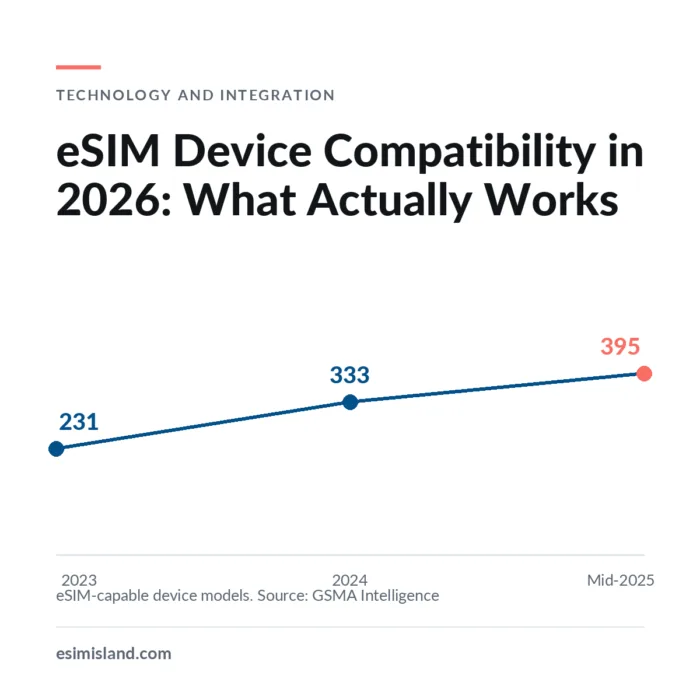
Cumulative eSIM-capable device models announced
Source: GSMA Intelligence device tracker, covering smartphones, tablets and smartwatches. 62 new models were announced in the first half of 2025 alone.
Sources: GSMA Intelligence; ABI Research; Juniper Research.
Those two figures together explain the current state well. GSMA Intelligence counted 395 eSIM-capable device models as of mid-2025, up from 231 in 2023, with 62 new models in the first half of 2025 alone. Meanwhile ABI Research noted that over 70% of smartphones actually in people’s hands still lacked support. New devices are overwhelmingly capable; the installed base takes years to catch up.
Broad position by device family
The following is orientation, not a substitute for checking. Support varies by exact model, by regional variant and by carrier, and it changes with each product cycle.
| Device family | Broad position | Where it gets complicated |
|---|---|---|
| iPhone | Supported from the 2018 generation onwards | Some regional variants, notably mainland China models, differ; recent US models ship without a SIM tray at all |
| Google Pixel | Supported from the third generation onwards | Certain carrier-specific variants of early models were excluded |
| Samsung Galaxy S and Z | Broadly supported on recent flagship generations | Regional variants vary; some markets shipped models without eSIM |
| Other Android flagships | Increasingly common on recent models | Highly variable by manufacturer, model and market |
| Mid-range and budget Android | Improving but far from universal | The largest single gap in global eligibility |
| iPad and tablets | Cellular models broadly supported | Wifi-only models have no cellular hardware at all |
| Smartwatches | Cellular models supported | Often tied to an operator plan rather than usable with travel eSIM |
Broad guidance only. Support varies by exact model, regional variant and carrier, and changes with each product cycle. Always verify against a current device list rather than a general rule.
The mid-range and budget Android row is the one that matters most globally. This is where the majority of the world’s handsets sit, and it is the single largest constraint on eSIM eligibility outside high-income markets. It is also the segment driving the disagreement between forecasters about how quickly adoption reaches the levels predicted for 2030.
The traps that catch people out
| Trap | What happens | How to catch it |
|---|---|---|
| Carrier lock | Capable hardware refuses to add a third-party profile | Ask the customer to confirm the device is unlocked before purchase |
| Regional variant | The same model number behaves differently by market of purchase | Check where the device was bought, not just the model |
| Old OS version | Provisioning fails on outdated software | State a minimum OS version in your requirements |
| Profile slots full | Device already holds several profiles and refuses another | Instruct on removing an unused profile first |
| Wifi-only tablet | No cellular hardware at all | Ask whether the model is the cellular version |
| Corporate MDM policy | Managed devices may block profile changes | Relevant for business sales; check with the client's IT |
Carrier lock is the most frequent and the most frustrating, because the customer usually has no idea their device is locked and the hardware is otherwise perfectly capable. It is also often resolvable: many operators will unlock a device once contract terms are met, so a customer turned away today may be eligible in a fortnight.
Regional variants are the trap that catches businesses rather than consumers. A company buying handsets across several markets can end up with the same model number behaving differently depending on where each unit was purchased, which is why a business deployment needs a physical audit rather than a review of the asset register.
How to check properly
How to check a device properly
- Look for an EID in the device settings; if there is one, there is an eUICC
- Confirm the device is not carrier-locked
- Check the regional variant, not just the model name
- Verify the OS version meets your minimum
- Check how many profiles are already installed
- Test with a real profile before promising anything at scale
What not to rely on
- A model name alone, without the variant
- Third-party lists that are not dated
- "Most modern phones support it"
- The customer's own assessment of their device
- An asset register, for business deployments
- A general rule about a manufacturer
The EID check is the most useful thing on that list because it is customer-verifiable and comes from the device itself rather than from a list somebody maintains. If a device shows an EID in its settings, it has an eUICC. That does not resolve carrier lock or management policy, but it answers the fundamental question without depending on model lookup.
What to do about it
Put a check before the payment sheet
Whatever form it takes, ask before you take money. Selling to an incompatible device produces a refund, a support ticket and a bad review, all of which cost more than the sale was worth.
Ask the two questions that matter
Is the device unlocked, and where was it bought? Those two catch most of the cases a model-name check misses. Both are questions a customer can answer without technical knowledge.
Teach customers to find the EID
The presence of an EID in device settings is the most reliable customer-verifiable signal that a device has an eUICC. It is more dependable than any list, because it comes from the device itself.
Keep your own list dated and reviewed
If you maintain a compatibility list, put a review date on it and check it each product cycle. An undated list drifts out of accuracy quietly, and customers rely on it as though it were current.
Design a good negative path
A customer whose device is not eligible should get a clear explanation and, where you can offer one, an alternative. A dead end produces a complaint; an honest answer before payment often produces a return visit after their next upgrade.
For business sales, audit rather than assume
Asset registers overstate model consistency and OS currency. Verify a sample of devices physically before committing to a deployment timeline, and expect a mixed estate.
Step five is worth more than it appears. A customer told honestly before payment that their device will not work is disappointed but not aggrieved, and a proportion of them return after their next handset upgrade. A customer who discovers it after paying, while abroad, is a refund, a support case and frequently a public review. The difference between those two outcomes is a check that costs nothing to run.
Frequently asked questions
Check eligibility before you take payment
eSIM Island supplies device compatibility data alongside API access, profile diagnostics and self-service reissue, so you can qualify customers before checkout rather than refunding them afterwards. Tell us about your product and we will set up test access.
Book a Free DemoOr explore the Reseller Program, API Integration and Business Roaming.
Leave a Reply